
What Is a TikTok Viewer? Uses, Tool Types and Public-Access Limits
Quick answer
A TikTok viewer is a browser tool for looking up public profiles or videos from a username or link. A useful viewer can show public metadata and play an available video without your TikTok login, but it cannot unlock private accounts, direct messages, drafts, or hidden lists. No-login viewing separates the lookup from your TikTok username; it is not the same as complete network anonymity.
A TikTok viewer is a browser tool for looking up public profiles and videos. You can start with a username, a profile address, or a video link instead of opening the TikTok app and searching through a signed-in feed. The useful ones explain what they can show and do not ask for your TikTok password.
That is the job Peektok is designed for. It can look up a public profile, open a public video in your browser, show visible engagement numbers, and offer an available video file through the downloader. The important limit is the word public. A viewer is not a way into private accounts or account-only data.
What does a TikTok viewer do?
People use "TikTok viewer" to describe a few related tools. A profile viewer is for checking an account. A video viewer is for opening one known post. Some downloaders include a viewer as part of the same workflow. In each case, the goal is simple: inspect a public TikTok item in a normal web browser.
Most viewers accept one of these two inputs:
- A profile handle or URL.Use this when you want an account summary, visible follower and like totals, recent public posts, or a repeatable way to check a creator's public presence.
- A video URL or share link. This is the better choice when you already have the exact post and want its title, author, thumbnail, engagement data, or inline playback.
What comes back depends on what TikTok exposes for that item and what the viewer can resolve at that moment. A post may stop working because it was deleted, restricted, expired, limited by region, or gated behind a login, even if the link worked earlier.
Choose a viewer by the question it can answer
A useful viewer identifies its input, the public fields it can return, and what it does when those fields are unavailable. Choose a profile lookup to check an account, a video lookup for one known post, or a repost lookup for public reposts when available. A promise to reveal private accounts is not an extra feature; it contradicts the access boundary.
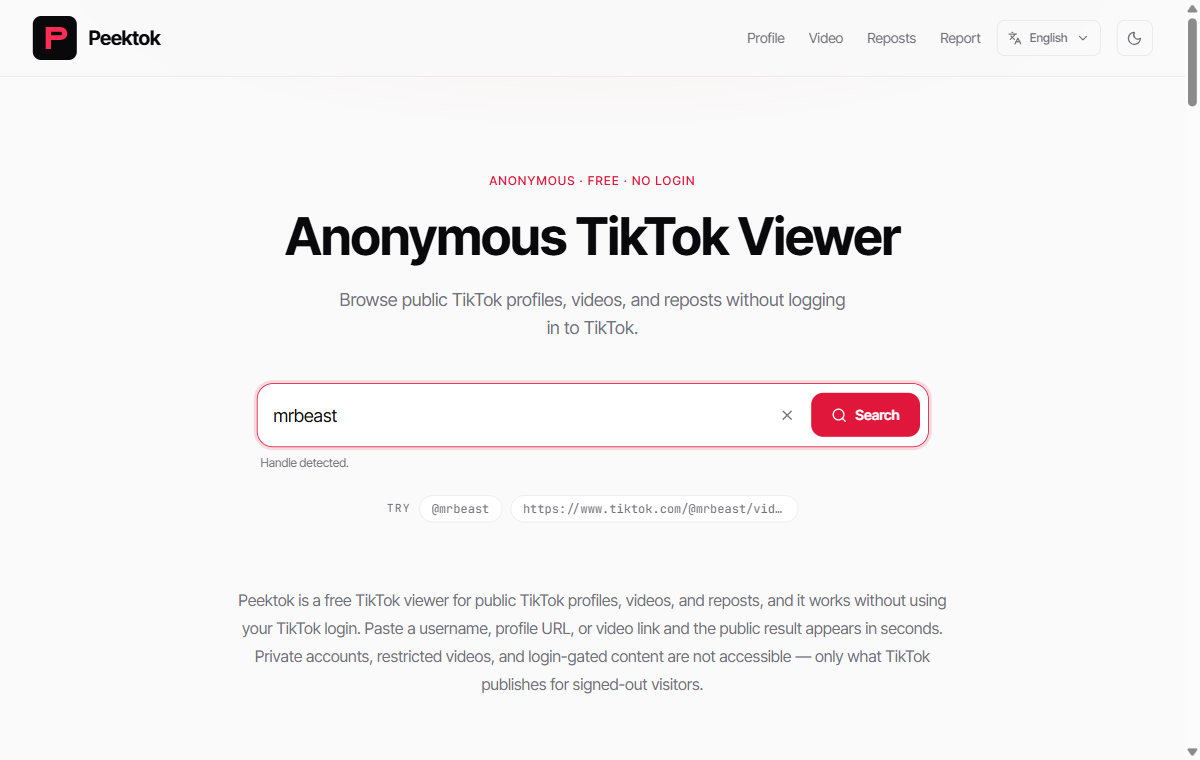
The input screenshot shows a handle before submission, not proof that a result will load. For the actual browser steps, including iPhone and Safari checks, use the no-account viewing instructions. This guide compares tasks and limitations rather than repeating that workflow.
TikTok profile viewer vs. TikTok video viewer
The two tools answer different questions. Start with the narrower one and the result is usually easier to read, especially when something fails.
| Task | Best input | Typical public result |
|---|---|---|
| Check an account | @handle or profile URL | Bio, visible totals, recent public videos |
| Watch one post | Full video URL or share link | Author, title, stats, thumbnail, playback |
| Compare public activity | A profile handle | Recent posts and visible engagement signals |
| Save an available file | Public video URL | A downloadable media response, when available |
If you are researching a creator, start with the profile and record the date. If you are checking one clip, start with its URL. A profile question paired with a video-only input is a common reason for an empty-looking result.
What can you see with a TikTok viewer?
A public viewer can show whatever information is available in the public response. Depending on the input and current availability, that may include a profile avatar, display name, handle, bio, follower and following totals, total likes, verification status, recent public videos, video thumbnails, titles, authors, view counts, like counts, comment counts, share counts, duration, and an available playback URL.
Some profile viewers also calculate a recent-post median or an estimated engagement rate. Those summaries can help organize public observations, but they are not the creator's private TikTok Analytics or a first-party dashboard.
Keep an eye on the date. Follower totals can change while you are looking at them, a post can disappear after a profile was cached, and an engagement calculation depends on which posts were included. When the result matters, save the URL, date, and exact values you saw.
What a TikTok viewer cannot show
A legitimate public TikTok viewer cannot turn a private account into a public one. It cannot reveal direct messages, display drafts, expose a hidden follower list, bypass an account restriction, or produce a complete history of everyone who visited a profile. A polished page that promises all of this is still making a claim you should not trust.
TikTok Stories, Reposts, age-gated posts, and region-limited media may also be less available than standard public videos. Peektok currently focuses on public profiles and standard videos. It does not support every TikTok surface, and a failed lookup does not mean a private item has been exposed.
That is also why a focused tool is more useful than a vague promise of "unlimited viewing." Treat the result as a public-data lookup, not as a replacement for an authenticated TikTok account. The guide on viewing TikTok without an account covers the same boundary from a no-login perspective.
Is using a TikTok viewer anonymous?
Usually, "anonymous TikTok viewer" means the lookup is not being made through your TikTok account. If a service does not ask you to sign in, the visit is not attached to your TikTok username in the same way as an authenticated visit. That distinction can be useful, but it is not complete anonymity.
The viewer, hosting provider, network provider, CDN, and browser can still process technical request data. A VPN may change the network layer, but it adds another trust decision and does not change whether the TikTok item is public. Do not read "anonymous" as a promise that every technical trace disappears.
Before using a third-party viewer, read its privacy policy and check the address bar. The checklist in Is a TikTok Viewer Safe? covers the practical warning signs: credential requests, fake download buttons, forced extensions, aggressive redirects, and promises about private content.
Common TikTok viewer problems
The profile cannot be found
Check the handle spelling and remove extra spaces. If possible, use the full profile URL. A display name can point to several accounts, while a handle can change or become unavailable. Private, deleted, restricted, or temporarily unavailable profiles may return no result.
The video metadata loads but playback fails
Media URLs can expire or be refused separately from the public title and counts. Try the original public URL again, avoid editing it by hand, and check whether the post still opens in a normal browser. Metadata can remain visible after a short-lived playback response has changed.
The numbers look different from TikTok
Public metrics may be rounded, delayed, cached, or calculated from a different sample. Treat the viewer as a snapshot. For comparisons, use the same input type, record when you collected the numbers, and do not turn one lookup into a claim about a creator's overall performance.
Frequently asked questions
Do I need to install an app?
No. Peektok is designed to work in a normal browser. You can paste a public profile or video link without installing the TikTok app or creating a Peektok account.
Do I need to enter my TikTok password?
No. A public viewer should never need your TikTok password, session cookie, QR login, or account export. Leave the page if it asks for credentials to reveal a supposedly public profile or video.
Can a TikTok viewer access private accounts?
No. A public-data viewer can only work with supported information that is available to it. Private accounts, drafts, messages, and restricted content remain outside the normal public viewer workflow.
What is the best TikTok viewer?
It depends on the job. Use a profile viewer for public account research, a video viewer for one known post, and a downloader only when you have a legitimate reason to save an available file. Compare tools by the input they accept, the public result they return, how clearly they explain privacy, and whether they avoid asking for TikTok credentials.
The simple way to choose
Start with what you actually have: a handle for a profile or a URL for one video. Use the narrowest viewer that answers your question, check the returned identity and media, and keep the public-only boundary in mind. That is faster than trying random tools that promise private access, complete visitor histories, or impossible anonymity.
For a public profile or video lookup, you can use the Peektok TikTok viewer without a TikTok login. Paste the link, review the result, and treat changing metrics as a dated snapshot rather than a permanent fact.
Sources and verification
We use primary or first-party documentation for platform behavior and device-specific steps. The update date records content changes, not a new check of every linked source. Illustrations and test examples carry their own dates where stated.
- Making your account public or private (opens in a new tab)
TikTok Help Center
TikTok’s explanation of the visibility boundary for public and private accounts.
- TikTok profile view history (opens in a new tab)
TikTok Help Center
Official details for TikTok’s account-based profile view history feature.
Try it now
Peektok TikTok Viewer
Look up public profiles and videos without a TikTok login.
Related articles
How to View TikTok Without an Account
View public TikTok profiles and videos without an account. Learn what anonymous viewing means, what owners can see, and what content remains private.
How to See Someone's Reposts on TikTok
Learn how to see someone's reposts on TikTok, why the Reposts tab may be missing, and how to check public reposts without an account.
Is a TikTok Viewer Safe? What to Check
Check whether a TikTok viewer is safe before searching. Learn the warning signs for passwords, private-content claims, downloads, redirects, and data handling.