
Is a TikTok Viewer Safe? What to Check
Quick answer
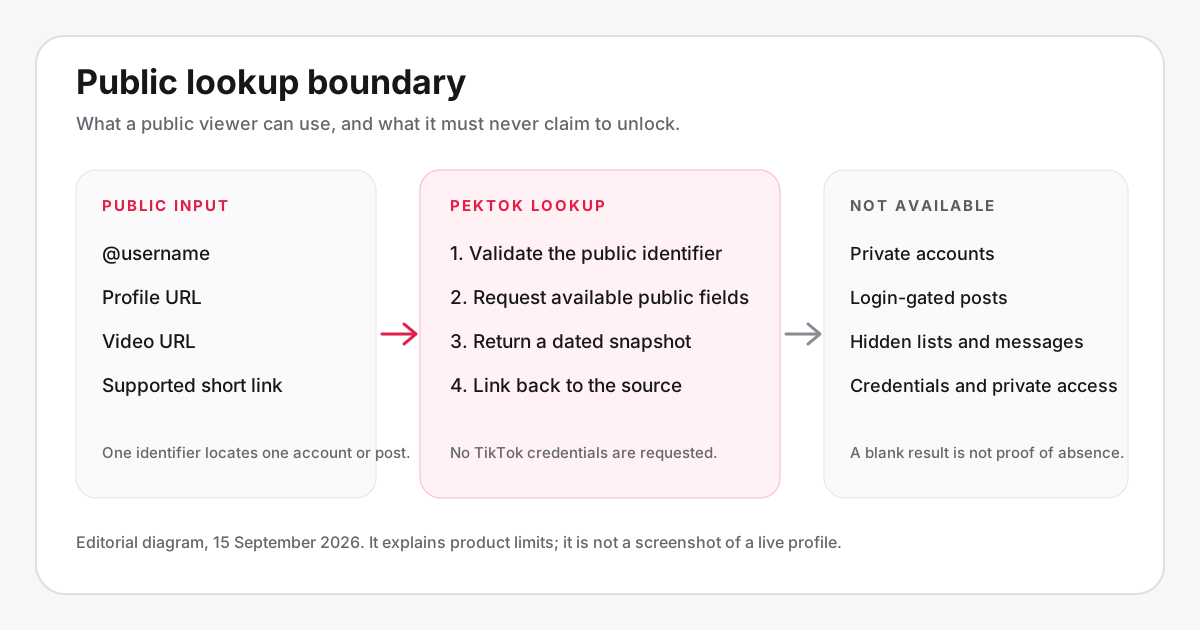
A TikTok viewer is safer when it accepts only a public handle or link, uses HTTPS, explains its data handling, and never requests TikTok credentials or software installation. No-login viewing avoids using your TikTok identity, but it does not promise network-level invisibility or access to private content.
Is a TikTok viewer safe to use? It can be, but the answer depends on the viewer. A site that accepts a public handle or link without asking for your TikTok password presents a much smaller risk than one that requests login credentials, an extension, or an app install. You still need to check its privacy policy, download behavior, and claims.
Safety also has several meanings. One person may care about whether a creator sees their TikTok username. Another may care about malware, search logs, copyright, or network privacy. A single "anonymous" badge does not answer all of those questions.
A practical safety check
| Check | Safer sign | Leave the site if |
|---|---|---|
| Input | It asks only for a public handle or URL | It requests a password, code, or session cookie |
| Connection | The page uses HTTPS | The browser reports an insecure connection |
| Software | The lookup runs in the page | It requires an EXE, APK, extension, or profile |
| Claims | It limits results to public content | It promises private accounts or messages |
| Privacy | A readable policy explains data handling | There is no policy or contact information |
Will the account owner see your username?
Peektok does not ask for your TikTok login and does not run a lookup through your TikTok session. For public profile and video searches, it has no TikTok username from you to submit as the visitor. This is the useful account-level privacy boundary.
TikTok's own profile-view history is a separate feature. Its availability and behavior can vary by account, settings, region, and app version. The important distinction is that a visit made while logged into TikTok may carry an account identity. A Peektok lookup is not made through that logged-in identity.
This does not make the whole internet connection invisible. A website can receive ordinary request data, your internet provider carries the traffic, and your browser may record the page in history. The guide to viewing TikTok without an account explains this boundary in more detail.
The biggest red flag: a TikTok login request
A public-data viewer should not need your TikTok password. It should not ask for a one-time verification code, backup code, recovery email, QR login, exported cookie, or session token either. Those items can provide access to your account even when a form claims it needs them only for "verification."
Do not enter fake credentials to test a suspicious site. Even a fake password can reveal how you construct passwords, and the page may still collect your email address or browser data. Close the tab. If you already submitted a real password, change it from TikTok directly, review active sessions, and enable the account security options available to you.
Be equally cautious with a "Sign in with TikTok" button on a site that only promises public profiles. A legitimate authorization screen should clearly show the domain and permissions, but a public lookup does not need account authorization in the first place.
For general phishing guidance, the U.S. Cybersecurity and Infrastructure Security Agency recommends treating urgent credential requests and suspicious links as warning signs. Its phishing checklist supports the same stop-and-verify approach.
Private-account and visitor-list scams
A viewer cannot approve its own follow request to a private account. It cannot reveal private videos, direct messages, drafts, hidden follower lists, or account recovery details through a normal public lookup. Sites often use those promises to keep visitors clicking through ads or to collect credentials.
"See everyone who viewed your TikTok" is another risky promise. TikTok may show limited view information inside its own product under certain settings, but that does not give an outside website a universal visitor database. A third-party page cannot truthfully produce a complete historical list merely because you type a username.
Look at the wording. "Unlock," "secret access," "human verification," and "complete a survey to reveal results" are common signs that the result is being withheld because it does not exist. Public tools should return a public result or explain why they cannot.
Download safety
A video download should be a media file or a browser playback page, not an installer. Check the filename and extension before opening it. An MP4 is common for video, while EXE, MSI, APK, DMG, ZIP, or a browser extension is unrelated to saving one public clip.
A misleading button can look more prominent than the real download control. On ad-supported sites, read the label and destination before clicking. If a page opens repeated popups, requests notification permission, or changes the button destination after a click, stop the process.
Downloading safely is separate from having permission to reuse the video. The TikTok download legality guide covers copyright, permission, and reuse. A file can be technically safe to open while still being inappropriate to republish.
Three privacy layers: identity, site logs, and network
- TikTok identity. A no-login lookup does not send your TikTok username or authenticated session as the visitor. This is the narrow account-level benefit.
- Viewer-site records. The site still processes the public handle or URL to answer the request and may keep limited operational, security, consent, or advertising data according to its privacy policy.
- Network and device records. Hosting providers, media hosts, a workplace or school network, an internet provider, and the browser can still observe or retain parts of the connection. Private browsing changes local history behavior; it is not a network cloak.
Evaluate these layers separately. A service can truthfully avoid using your TikTok account while still having ordinary web logs, and a VPN can change the network path without making a dishonest viewer safe. The specific data practices below describe Peektok rather than every third-party site.
What Peektok records
Peektok's current privacy policy says its query-events table receives a one-way input hash, input type, country code when available, cache status, and timestamp—not the submitted handle or URL. The submitted value is still processed to complete the request, and configured providers apply their own policies. Rate limiting processes a network address at the edge without writing it to the query-events table.
The same policy explains that recent-search chips and theme preferences use browser storage, and that advertising may use Google cookies. Playback and source-media links can connect the browser to TikTok or another source host, where that host's handling applies. Read the full Peektok privacy policy rather than treating "no login" as a complete privacy statement.
Policies can change. Check the displayed update date when the search is sensitive, and do not use any public lookup for information that would put someone at risk if it appeared in browser history or an operational log.
Does a VPN make a viewer safe?
A VPN changes the network path and the public IP address seen by a destination. It does not inspect a viewer's honesty, remove malware from a download, or stop you from entering a password into a phishing form. It solves a different problem.
You do not need a VPN merely to prevent a Peektok lookup from using your TikTok username, because Peektok does not use your TikTok login. You might choose a VPN for broader network privacy, but then the VPN provider becomes another party you must trust.
A safer lookup workflow
- Confirm that the profile or video is public and that you have the correct handle or URL.
- Open the viewer directly rather than through a shortened advertising redirect.
- Check HTTPS, the privacy link, and the domain spelling before entering anything.
- Paste only the public identifier. Do not provide TikTok credentials or personal details.
- Review the result in the browser. Treat installers and private-content promises as failures.
- Close the page and clear local history if that matters for your device-level privacy.
Peektok's anonymous TikTok viewer follows the public-identifier workflow. The profile viewer is the narrower option when you only need public account details.
Frequently asked questions
Can a viewer get my TikTok account banned?
A viewer that never uses your TikTok account has no account session to act through. That is different from logging into an outside service with your TikTok credentials, which can expose the account and create separate terms or security risks.
Are TikTok viewers affiliated with TikTok?
Peektok is an independent service and does not claim TikTok or ByteDance affiliation. Treat any outside viewer's official-looking logo or wording cautiously unless the relationship is documented by TikTok itself.
Can I use a viewer on a shared device?
You can, but browser history, downloads, and recent searches may remain on that device. Use a private browser window if appropriate, avoid saving files, and follow the device owner's rules.
What should I do after using a suspicious viewer?
If you only opened the page, close it and review any permissions it requested. If you entered TikTok credentials, change the password from TikTok, inspect active sessions, and do not reuse that password elsewhere. Delete unexpected downloads without opening them.
Safety on shared and managed devices
A safe website can still leave sensitive traces on the device. Browsers may save history, cached images, recent-search chips, form text, and downloaded files. On a work, school, or family device, follow the owner's rules and avoid searches that would expose another person if someone opened the history.
Private browsing reduces some local records after the window closes, but it does not hide traffic from the network administrator or erase a file you downloaded. Check the Downloads folder and close media tabs when the lookup is finished.
If the browser displays a certificate warning, malware warning, or blocked-download notice, stop. Do not disable security controls just to view one public profile.
Check the domain after every redirect
Search results and advertisements can send you through several domains before the page that performs the lookup. Read the address bar again before entering a handle or opening a download. A familiar logo does not prove that you are still on the expected site.
Shortened links hide the destination, so avoid them for sensitive searches. Bookmark the verified HTTPS page directly. If the spelling changes by one character or the browser shows a certificate warning, stop and return through a known link.
This check is simple, but it catches phishing copies that a feature checklist cannot.
Bottom line
A TikTok viewer is safer when it stays within public content, accepts only a handle or link, uses HTTPS, explains its data handling, and never asks for your TikTok account. Peektok meets that narrower public-viewing model. It does not promise private access or network-level invisibility, and neither should any viewer you trust.
Sources and verification
We use primary or first-party documentation for platform behavior and device-specific steps. The update date records content changes, not a new check of every linked source. Illustrations and test examples carry their own dates where stated.
- Recognize and Report Phishing (opens in a new tab)
CISA
U.S. government guidance for recognizing suspicious links and credential requests.
- Making your account public or private (opens in a new tab)
TikTok Help Center
TikTok’s official public/private boundary, which legitimate viewers cannot override.
Try it now
Peektok TikTok Viewer
Look up public profiles and videos without a TikTok login.
Related articles
What Is a TikTok Viewer? Uses, Tool Types and Public-Access Limits
Choose between TikTok profile, video and repost viewers. Compare supported inputs, public results and privacy limits before starting a lookup.
How to View TikTok Without an Account
View public TikTok profiles and videos without an account. Learn what anonymous viewing means, what owners can see, and what content remains private.
TikTok Viewer for Public Profiles: What You Can Check
Use a TikTok viewer for public profiles to check visible stats, recent posts, and profile links without a TikTok login. Learn the limits before you search.