
How to View TikTok Without an Account
Quick answer
You can view public TikTok profiles and videos without an account by using a public viewer or a signed-out browser. Peektok does not use your TikTok login, so the lookup is not attached to your TikTok username. That does not provide network-level anonymity, and private accounts, messages, drafts, hidden lists, and restricted content remain unavailable.
Wondering how to view TikTok without an account? Start with a public profile or video. The simplest route is to paste a username or TikTok link into a public viewer such as Peektok. It shows the public profile, recent videos, and visible engagement numbers without asking for your TikTok login. It cannot unlock private accounts, direct messages, drafts, or other content that TikTok keeps behind an account or permission check.
That is also the honest meaning of “anonymous” in this guide: the lookup is not made through your TikTok account, so it is not attached to your TikTok username. It does not mean that you become invisible to your internet provider, the website you use, or every service involved in loading media. Those are separate layers of privacy.
How to view TikTok without an account
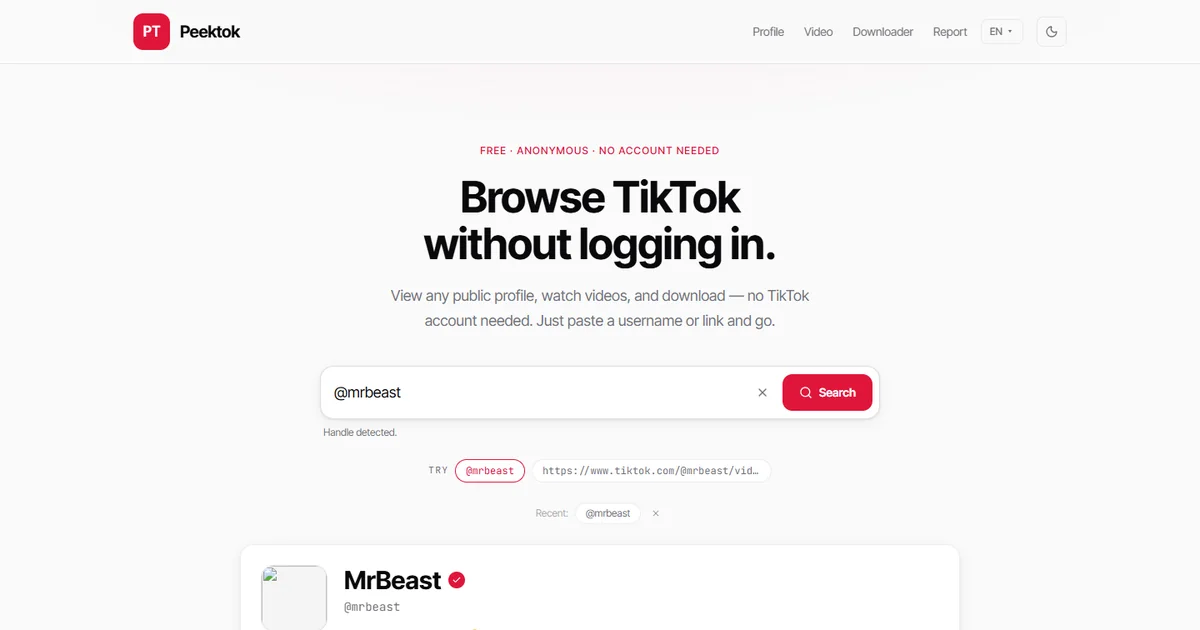
Peektok accepts a handle, a profile URL, a full video URL, or a TikTok short link. You do not need to create a Peektok account for a normal public lookup, and you should never enter your TikTok password into a third-party viewer.
- Open the viewer. Use the dedicated anonymous TikTok viewer when privacy is your main concern, or open the TikTok profile viewer for a profile-focused layout.
- Paste a public identifier. Enter a username with or without the @ sign, a profile address, a video address, or a vm.tiktok.com / vt.tiktok.com short link. Check the spelling before searching; display names are not always the same as unique handles.
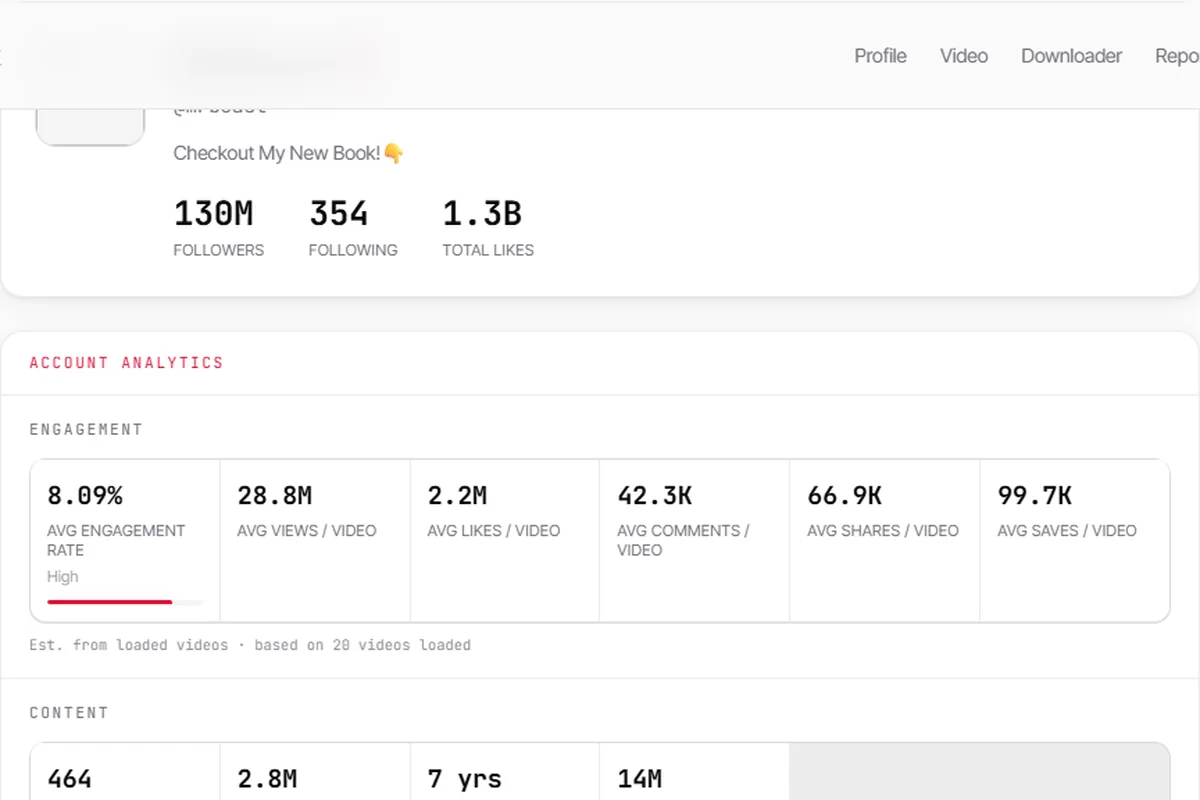
- Review the public result. A successful profile lookup can show the display name, handle, bio, follower and following totals, total likes, recent public videos, and calculated engagement summaries. A direct video link opens the video-specific result instead.
For this guide, we ran a fresh lookup in a browser that was not signed in to TikTok. The public @mrbeast example loaded a profile summary, account-level estimates, and 20 recent public videos. The values in the screenshot are a point-in-time result, not permanent facts; follower totals and video metrics change constantly.
Which input gives the most reliable result?
A unique @handle is the cleanest choice for a profile lookup because it identifies one account. A display name is weaker: many people can use the same name, and changing a display name does not necessarily change the handle. If you already have a profile URL, paste the whole address instead of copying only the visible name.
For a particular post, use the full video URL. That keeps the lookup focused on one item and avoids guessing which recent video you meant. Short vm.tiktok.com and vt.tiktok.com links can work too, but they are redirects rather than permanent identifiers. If a short link has expired or was copied incompletely, open it in a browser first and copy the final TikTok URL.
Handles and URLs are not search-by-description tools. Peektok cannot find “the cooking video with the blue pan” or discover a person from a partial real name. When you do not know the exact handle, first confirm it from a source you trust, then run the public lookup. This reduces false matches and avoids treating the wrong account's public statistics as evidence about someone else.
iPhone and Safari checks before you retry
On an iPhone, start in Safari with the exact public link rather than repeatedly tapping an app banner. If the normal tab appears stuck in a login loop, try one Private Browsing tab. That can separate a stale cookie or local session problem from a genuinely unavailable profile. Private Browsing reduces records kept on that device after the tab is closed; it does not hide the request from the viewer, media host, network operator, or internet provider.
Links copied from a message or the iOS Share sheet are sometimes short redirect URLs. Open the shared link once, wait for it to resolve, and then copy the final address from Safari's address bar. For a video, the useful canonical form normally identifies both the @handle and the video; for a profile, keep the final /@handle address. This avoids retrying an expired wrapper link or attributing a result to the display name shown in a message preview.
A content blocker can also stop a script, challenge, or media request that the result needs. Test once with the blocker relaxed for the specific site, or compare a normal tab with Private Browsing, then restore your preferred setting. Do not install an unknown extension or configuration profile to make a public lookup work. If the original public TikTok page and the viewer both fail, treat the item as unavailable rather than weakening device security controls.
What “anonymous TikTok viewing” really means
Privacy is easier to understand when it is split into layers. A viewer can avoid using your TikTok identity without promising that no computer anywhere sees a request. Peektok never asks for your TikTok credentials and does not operate through your TikTok session. As a result, it cannot submit a profile visit under your TikTok username.
| Privacy layer | What happens |
|---|---|
| Your TikTok account | It is not used. Peektok never asks for your TikTok password. |
| The profile owner | The lookup is not sent as a visit from your TikTok account. |
| Peektok and network services | Ordinary web requests can include technical data such as an IP address. |
| Your device | Browser history, downloads, and consented cookies follow your browser settings. |
TikTok may offer profile-view history inside its own apps, depending on the account, settings, and current product availability. Peektok does not sign in as you or navigate with your TikTok session, so there is no TikTok account identity for it to attach to that feature. Those account-level conditions belong to TikTok itself; this is different from claiming network anonymity. Read the Peektok privacy policy for the site's current handling of searches, analytics, cookies, and operational logs.
What can you see without logging in?
The dividing line is public availability, not whether a viewer has discovered a secret way around TikTok. Results can also vary by region, age restriction, account settings, and the current availability of a public media URL.
| Content | Available? | Important limit |
|---|---|---|
| Public profile details | Usually | Only fields exposed for that public account |
| Public videos and visible counts | Usually | Removed, restricted, or expired media can fail |
| Private videos | No | A viewer cannot approve a follow request |
| Messages, drafts, or watch history | No | These belong to an authenticated account |
| Follower or following lists | No | Peektok shows public totals, not member lists |
Peektok focuses on public profiles, standard videos, downloads, reposts, and visible engagement summaries rather than claiming support for temporary or account-only content.
TikTok's website vs a public viewer
TikTok's own website may show individual public videos or profile pages while you are signed out. What appears can vary by location, browser state, and the page you open, and prompts to log in or use the app can interrupt browsing. A separate viewer is useful for a quick lookup because its interface is built around public handles and links rather than a personalized feed.
| Task | TikTok signed out | Peektok |
|---|---|---|
| Open a known public profile or video | May work | Supported through a handle or URL |
| Like, comment, follow, or personalize a feed | Account required | Not supported |
| See profile and video statistics together | Limited layout | Shown in one result |
| Open private or login-gated content | No while signed out | No |
If your goal is simply to avoid another mobile app, use the browser and iPhone checks above. For one known video rather than a profile, use the public TikTok video viewer.
How to avoid unsafe TikTok viewer sites
A viewer only needs the public handle or link you want to check. Treat any request for your TikTok password, verification code, session cookie, or recovery email as a reason to leave. A tool that promises private-account access is not offering an advanced version of public viewing; it is making a claim that the public workflow cannot deliver.
- Do not enter TikTok credentials. Public lookups do not require them.
- Check for HTTPS. The address bar should show a secure connection.
- Expect a page, not an installer. A lookup should not require an EXE, APK, extension, or configuration profile.
- Reject private-account promises. They are a common bait tactic.
- Read the privacy policy. “No TikTok login” is not the same as “no operational data.”
The longer TikTok viewer safety guide explains these red flags and the separate “see who viewed your profile” scam in more detail.
Troubleshooting a lookup
- “Profile not found.” Recheck the unique @handle. Display names can be shared, and handles can change.
- A private or empty result. The account may be private, removed, restricted, or unavailable in the viewer's region.
- A short link fails. Open it once to confirm it redirects, then paste the resulting full TikTok URL.
- A video does not play. Public media links can expire. Run the lookup again for a fresh result.
- A rate-limit message appears. Stop retrying for a few minutes; repeated requests can extend a temporary limit.
Frequently asked questions
Can I watch TikTok videos without an account?
Yes, if the video is public and currently available. Paste its URL into a viewer or try its public TikTok page while signed out. Restricted, deleted, or private videos will not become available just because a different interface is used.
Will the creator see my TikTok username?
Peektok does not ask for or use your TikTok account, so it has no TikTok username to send as your identity. This is narrower than a promise of total anonymity: normal network requests and browser history can still exist.
Do I need a VPN?
Not to prevent a lookup from being associated with your TikTok username, because no TikTok login is used. A VPN addresses network-location and IP exposure, which is a different privacy question and depends on whom you trust as the VPN provider.
Can any viewer open a private account?
No public viewer can grant itself approval to a private account. At most, a service may show limited profile fields that remain public. It cannot legitimately reveal private posts, messages, drafts, or a hidden follower list.
Is viewing public TikTok content legal?
Simply viewing public material is different from copying or republishing it. Copyright, privacy, platform terms, and local law can matter when you download, reuse, monitor, or commercialize someone else's content. This guide covers viewing behavior, not legal advice.
The short version
To view TikTok without an account, use a known public handle or link, stay within content the creator has made public, and choose a viewer that never asks for TikTok credentials. Peektok keeps the useful privacy claim specific: your TikTok account is not used for the lookup. It does not pretend that private content can be unlocked or that ordinary internet connections stop existing.
Sources and verification
We use primary or first-party documentation for platform behavior and device-specific steps. The update date records content changes, not a new check of every linked source. Illustrations and test examples carry their own dates where stated.
- Making your account public or private (opens in a new tab)
TikTok Help Center
Official account visibility rules that define what signed-out viewing can access.
- TikTok profile view history (opens in a new tab)
TikTok Help Center
TikTok’s documentation for its in-app profile view history controls.
Try it now
Peektok TikTok Viewer
Look up public profiles and videos without a TikTok login.
Related articles
What Is a TikTok Viewer? Uses, Tool Types and Public-Access Limits
Choose between TikTok profile, video and repost viewers. Compare supported inputs, public results and privacy limits before starting a lookup.
TikTok Viewer for Public Profiles: What You Can Check
Use a TikTok viewer for public profiles to check visible stats, recent posts, and profile links without a TikTok login. Learn the limits before you search.
Is a TikTok Viewer Safe? What to Check
Check whether a TikTok viewer is safe before searching. Learn the warning signs for passwords, private-content claims, downloads, redirects, and data handling.