
How to See Someone's Reposts on TikTok
Quick answer
To see someone's reposts on TikTok, check the Reposts tab on the correct public profile. If you do not want to sign in, Peektok can request reposts available for that username. A missing result is not proof that the person has never reposted: privacy settings, deleted posts, regional differences, login gates, and temporary request limits can all affect what appears.
If you are trying to learn how to see someone's reposts on TikTok, start with their public profile. TikTok may show a Reposts tab there. If the tab is missing, or you would rather not sign in, Peektok can check the reposts currently available for a public username. Neither method unlocks a private account or guarantees that every repost will appear.
A blank Reposts tab does not prove that the account has never reposted anything. The person may have no visible reposts, the original post may have been deleted, TikTok may limit the result by region or session, or the request may be delayed. Treat the result as a current snapshot, not a permanent record of everything the account has shared.

How to see someone's reposts on TikTok
The normal route is inside TikTok. Open the person's profile and look for the icon with two circling arrows. TikTok calls this the Reposts tab. TikTok's own help page says reposting shares a video with friends and the wider community through the For You feed, and that reposted videos can be found under the Reposts tab on a profile. You can read the current instructions in the TikTok Help Center.
- Open the correct profile. Use the unique @username, not just the display name. If you are unsure, follow the checks in our public-profile verification guide.
- Look for the Reposts tab.It uses a repeat-arrow icon and is separate from the account's own video grid. Its availability can differ across accounts, app versions, regions, and viewing sessions.
- Open a repost and check the original creator.A repost is someone else's post being recirculated. The creator name, caption, date, and engagement belong to the original post, not to the person whose profile you are checking.
If the profile is private, respect the privacy setting. A viewer cannot turn a private Reposts tab into public content. If the profile is public but TikTok asks you to sign in, you can try the no-account method below for public results when available.
Desktop Reposts tab: symptoms and checks
On desktop, open the canonical public profile URL and inspect the row of profile tabs beneath the bio and counts. When TikTok exposes it in that browser session, the Reposts tab uses the same repeat-arrow idea as the mobile control. A desktop page can still show a login prompt, omit the tab, or load the profile while the repost panel remains empty. Those outcomes are different and should not be collapsed into “this person has no reposts.”
| Desktop symptom | What it may mean | Next check |
|---|---|---|
| The profile does not load | Wrong handle, private or removed account, regional limit, or temporary failure | Verify the canonical profile URL before checking reposts |
| The profile loads but the Reposts tab is absent | The tab is not exposed in this account, region, or signed-out session | Compare one public lookup; do not infer a complete history |
| The tab opens but is blank | No currently visible items, cache delay, deleted originals, or request limits | Wait, refresh once, and verify a returned item with its original creator |
A screenshot records only what one browser displayed at one moment. It can help document the handle, URL, date, visible tab, and a specific item, but it is not proof of a complete repost history. Cropping can remove context, interfaces can change, and a repost card still belongs to the original creator. For a consequential claim, keep the canonical URL and timestamp and verify the live item; do not rely on a screenshot alone as evidence of authorship, intent, or absence.
What has and has not been verified
The September 15, 2026 input screenshot below shows the form before submission. It does not establish that repost results or a second page loaded. During a Windows Chromium check on September 28, 2026, the @mrbeast lookup was blocked by a DNS failure while loading the browser verification dependency; the business API was not reached. That observation does not prove the production lookup is unavailable to other visitors.
To verify a result in your own session, record the handle, browser, time, first returned item and original creator link. Use Load more only if offered, and record whether new items arrive or a specific error appears. Do not call an input screenshot or an untested pagination control evidence of a complete repost history.
How to view public reposts without an account
Peektok's TikTok Repost Viewer is designed for this narrower task. It first resolves the public profile, then requests the repost page separately from the account's standard Videos tab. You do not need to connect a TikTok account or enter a TikTok password.
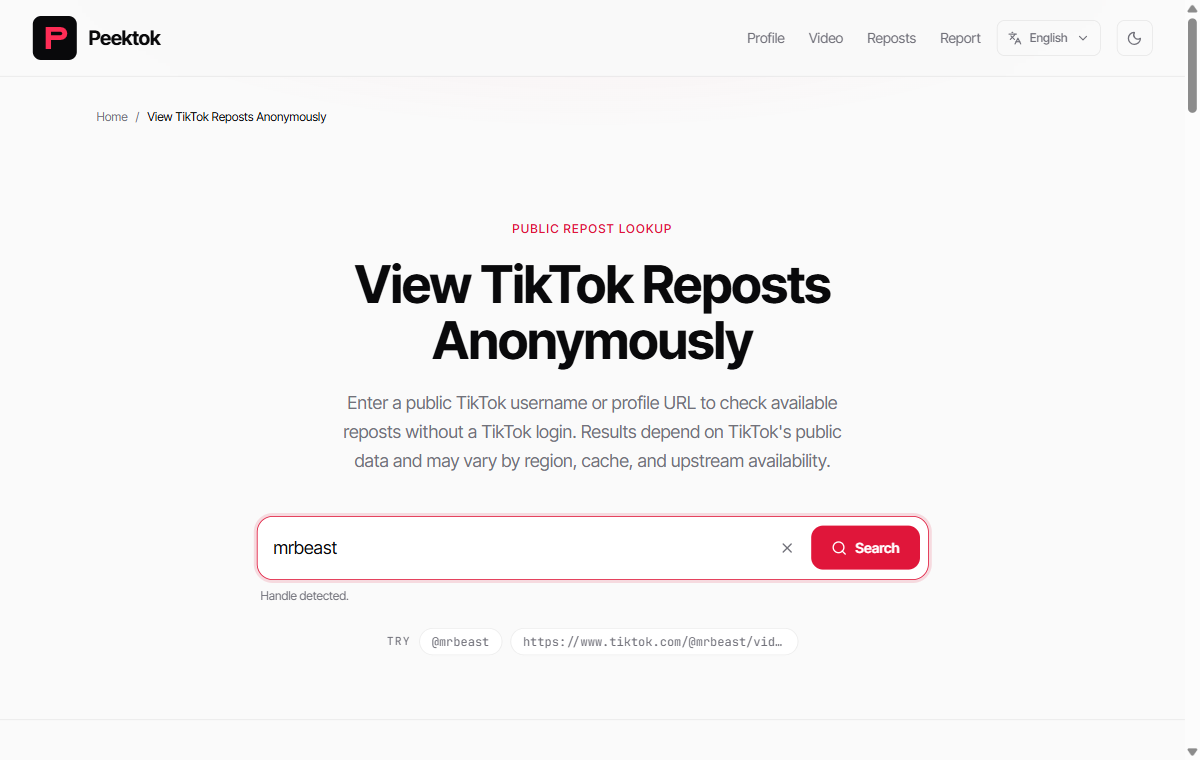
Keep the screenshot's two stages distinct: entering a handle only prepares the request; it does not confirm that reposts exist. Confirmation comes after the profile resolves and the separate repost response returns public items. That distinction matters when documenting an empty result.
- Enter a public username or profile URL. A unique handle is the cleanest input. Remove accidental spaces and double-check dots or underscores.
- Run the lookup. Peektok loads the public profile, then requests available reposts. A security check may appear before the request is sent.
- Review the Reposts result. Open a supported item to inspect the public post. If more pages are available, use the load-more control instead of repeatedly starting the same search.
Peektok does not store a private archive of somebody's activity. It requests what is available at the time of the lookup. For a broader explanation of signed-out viewing, read how to view TikTok without an account.
What a repost lookup can and cannot show
| Result | May be available | Not available |
|---|---|---|
| Account | Public username, display name, avatar, and visible profile totals | Private profile details or hidden account data |
| Reposts | Reposts available for the current public lookup | Deleted, private, restricted, or login-gated reposts |
| History | The pages returned for the current lookup | A complete lifetime log or proof that no other reposts exist |
Image posts and videos may both appear when TikTok makes them available. Profile and repost lookups are separate requests, so one can work while the other temporarily fails. Successful repost pages are cached for up to one hour, which means a very recent change may not appear immediately.
Reposts are not the same as uploaded videos
A person's Videos tab contains posts published by that account. The Reposts tab points to posts published by other creators that the person chose to recirculate. This distinction helps you avoid attributing the wrong words, footage, or view count to the profile owner.
Before quoting or saving anything, open the item and identify the original creator. A repost can also disappear without the profile owner taking action if the original creator deletes the post, changes its visibility, or loses access to the account. Public availability is temporary evidence, not ownership or permission to reuse the content.
Will they know you viewed their reposts?
A no-login Peektok lookup is not made through your TikTok identity, so Peektok does not submit your TikTok username as the viewer. That is different from promising complete anonymity. Peektok, its infrastructure, media hosts, your browser, and your internet provider may still process ordinary technical data. The site's privacy policy explains the data handling that applies to Peektok.
If you open a repost inside TikTok, the situation is different. A repost points to the original post, and TikTok's Post View History may show qualifying views to the original creator. This is separate from Profile View History, which concerns visits to a profile. TikTok's eligibility rules and privacy settings can affect what appears. Read TikTok's current explanation of Post View History before relying on the feature.
Profile View History is about profile visits, not views of the original post behind a repost. A Peektok lookup has no TikTok account identity to place in that feature, but it also cannot tell you who viewed a profile.
Why someone's TikTok reposts may not show
- The account is private. Peektok does not bypass approval or privacy controls.
- There are no visible reposts. The person may not have reposted anything, or TikTok may not make the activity available in your current context.
- The original post changed. Deletion, visibility changes, regional restrictions, or moderation can remove an item from the public result.
- The username is wrong or outdated. Handles can change. Confirm the profile avatar and bio before drawing a conclusion.
- The repost request is temporarily limited. It can be delayed or unavailable even when the main profile loads.
- A cached page has not refreshed yet. Wait and check again later instead of sending many identical requests in a short period.
A practical troubleshooting order
- Confirm the exact @username on the public profile.
- Check whether the profile itself loads in the regular TikTok app or website.
- Try the Peektok profile viewer to separate a profile problem from a repost problem.
- Open the Repost Viewer once and wait for the separate repost request to finish.
- If it returns a temporary service or rate-limit message, wait before retrying.
If the regular TikTok Profile Viewer works but the Reposts tab does not, the handle is probably valid and the issue is limited to repost availability. Repeated searches cannot make private or unavailable data become public.
Safety checks before using a repost viewer
A public viewer should not need your TikTok password, an app installation, a browser extension, or payment details for a basic lookup. Leave if a page asks you to log in with TikTok credentials outside TikTok, download an unknown file, or complete endless verification steps. Our TikTok viewer safety checklist covers redirects, permissions, private-content claims, and credential risks in more detail.
Also consider the purpose of the search. Public does not mean consequence-free. Do not use a repost list to harass someone, monitor a child or coworker without authority, or republish a creator's work without permission. If a result violates your rights or reveals material that should no longer be linked, use the Peektok report form.
Frequently asked questions
Can you see all of someone's reposts on TikTok?
No method should promise a complete lifetime list. You can only see the reposts available in your current TikTok app session or public lookup. Private, deleted, restricted, older, or login-gated items may be absent.
Can I see TikTok reposts without following the person?
Public reposts may be visible without following the account, but availability varies. A private account still requires the owner's approval, and a third-party viewer cannot bypass that choice.
Why did a repost disappear?
The profile owner may have removed the repost, or the original creator may have deleted the post or changed its audience. Regional availability, moderation, cache timing, and temporary service errors can produce the same visible outcome.
Does Peektok show who reposted a specific video?
No. The tool starts from a public username and requests the reposts available for that profile. It does not reveal a hidden list of everyone who reposted a particular video.
Can I remove my repost from TikTok?
TikTok's Help Center says you can open the reposted video, use the Share menu, and choose Remove repost. TikTok may also offer removal by pressing and holding the video or tapping your profile photo on the video. Check the official instructions because app controls can change.
How to check reposts reliably
Start with the exact @username, compare the Reposts tab with a fresh Peektok lookup, and verify the original creator before attributing a post. If either source is blank, wait and check again rather than treating the absence as proof. A careful check accounts for privacy settings, deleted originals, regional differences, and temporary request limits.
Sources and verification
We use primary or first-party documentation for platform behavior and device-specific steps. The update date records content changes, not a new check of every linked source. Illustrations and test examples carry their own dates where stated.
- Repost (opens in a new tab)
TikTok Help Center
TikTok’s official explanation of reposting and removing reposts.
- TikTok post view history (opens in a new tab)
TikTok Help Center
Official details for a separate view-history feature that should not be confused with reposts.
Try it now
TikTok Repost Viewer
No TikTok login required. Public reposts only.
Related articles
How to View TikTok Without an Account
View public TikTok profiles and videos without an account. Learn what anonymous viewing means, what owners can see, and what content remains private.
Is a TikTok Viewer Safe? What to Check
Check whether a TikTok viewer is safe before searching. Learn the warning signs for passwords, private-content claims, downloads, redirects, and data handling.
What Is a TikTok Viewer? Uses, Tool Types and Public-Access Limits
Choose between TikTok profile, video and repost viewers. Compare supported inputs, public results and privacy limits before starting a lookup.